From editor to agent management — Google Antigravity 2.0 marks the arrival of the Agent OS
Antigravity 2.0 is not an AI-IDE update. It is the moment the centre of gravity in developer experience shifts from "the editor" to "agent management." The Desktop / CLI / SDK / integration funnel together stop being a "specialist worker" like Claude Code / Codex / Grok Build, and start looking like an Agent OS.
The old axis "which model is smarter" is no longer enough. Harness design, permission boundaries, context, scheduled execution, and human review — these five decide developer productivity now. The next battlefield of AI coding, laid out.
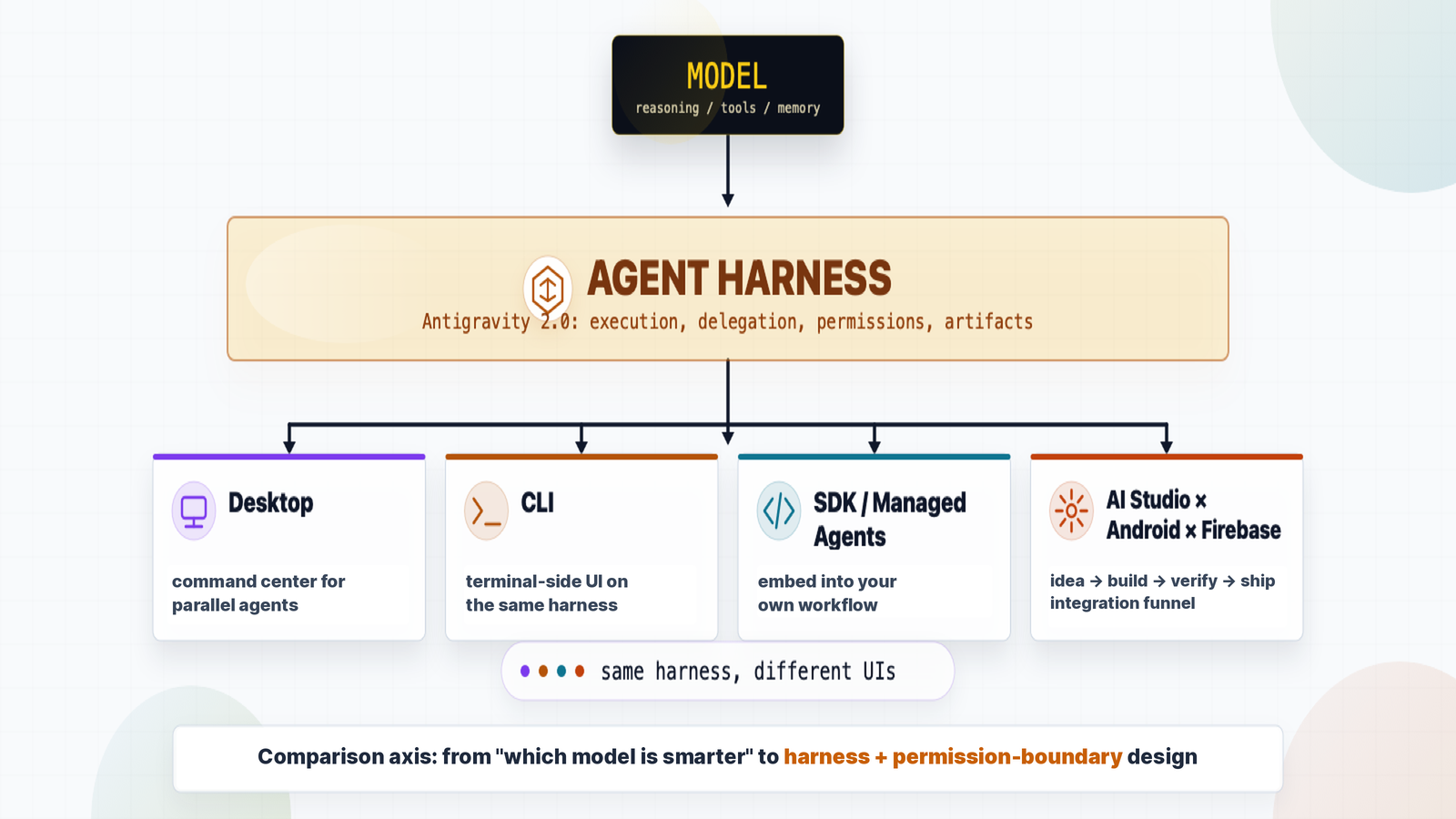
Antigravity 2.0 is not an editor — it is an Agent OS. It is not in the same layer as Claude Code / Codex / Grok Build (the specialist workers); it is the layer that binds Desktop / CLI / SDK / API together. The next battlefield of AI coding is not inside the editor — it is how you orchestrate, supervise, and continuously run agents.

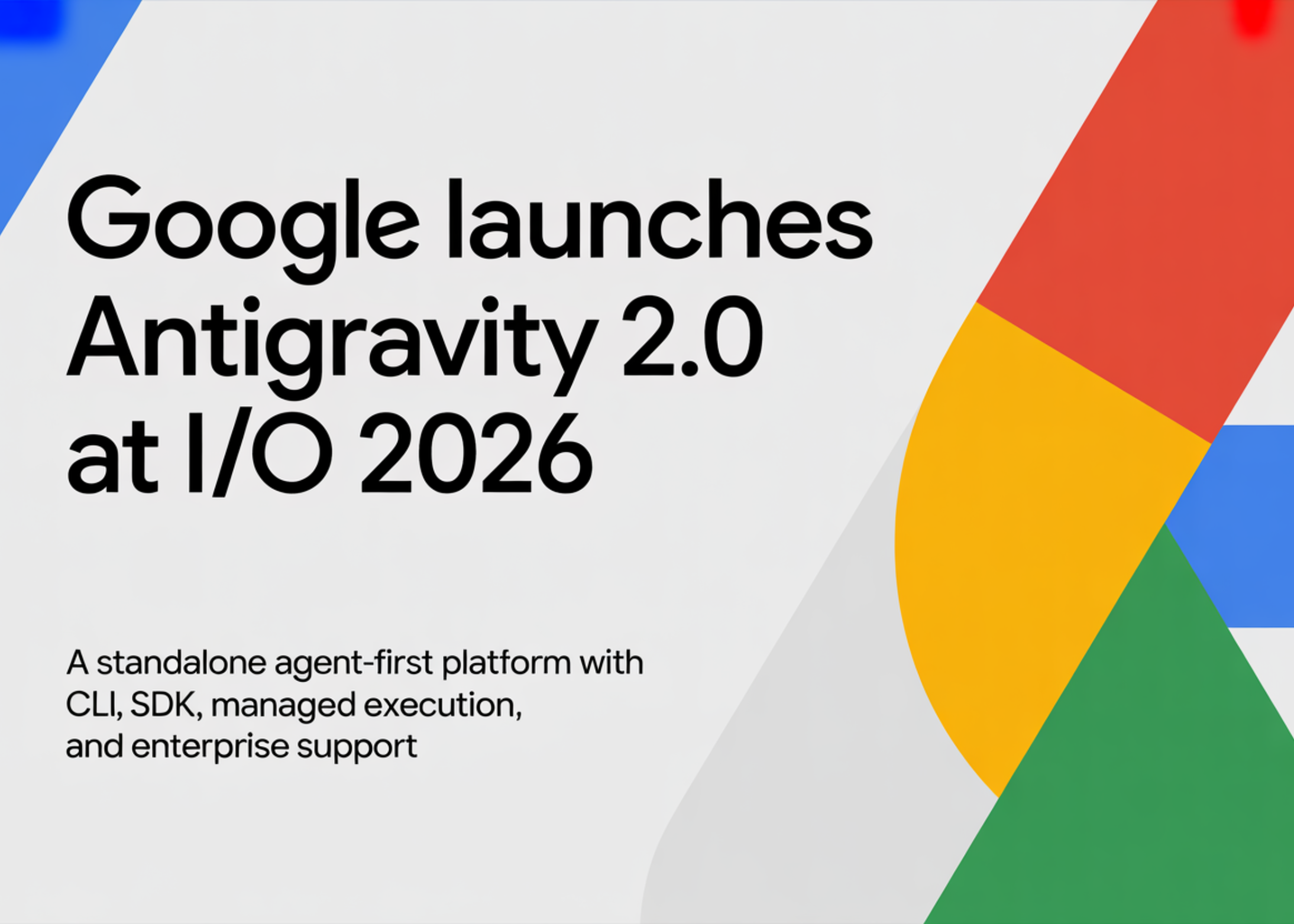
Aligning the vocabulary and editorial lens up front, before they recur in later sections. Detailed discussion lives in each section.
- Agent harness
- The "execution rig" wrapped around the model. In Karpathy's Agent = Model + Harness formulation, this is the Harness side. Concretely, the runtime that binds:
- System prompt / role definition (how the model is told to behave)
- Tools (function calling) — file I/O, Bash, web fetch, external systems via MCP, etc.
- Memory / state — conversation history, file locations, prior decisions
- Permissions and guardrails — read-only or write-capable, does Bash require approval, etc.
- Feedback loops — retry on error, output verification, sub-agent spawning
- Claude Code's harness = CLI agent loop + built-in tools + project permissions + ToolUse/ToolResult pipeline
- Cursor's harness = editor integration + Apply mechanism + codebase index
- Antigravity's harness = local app server + agent harness runtime + Skill-pack attachment mechanism
- Agent OS layer / Specialist worker layer
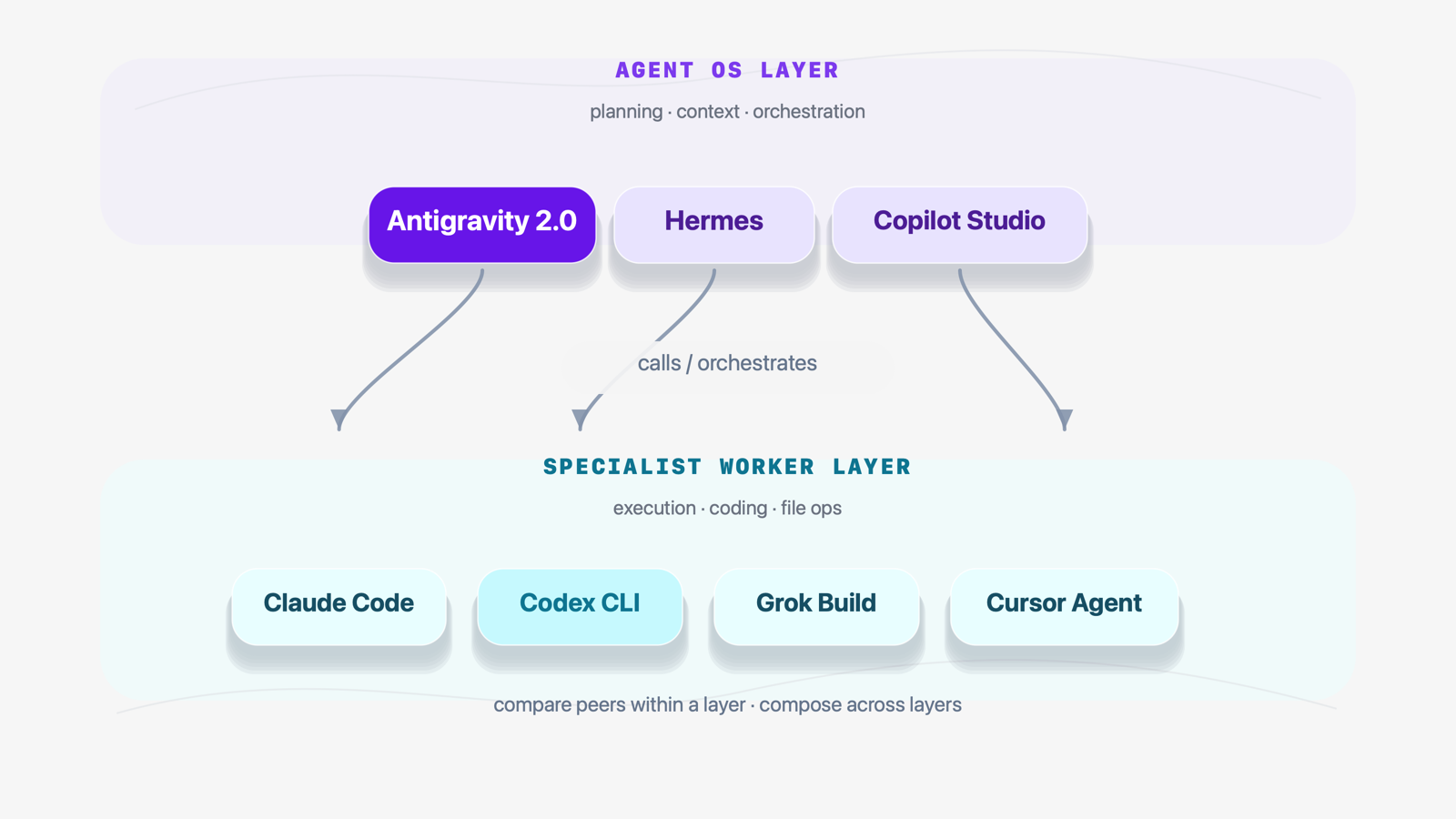
- The central axis of this piece. Agent OS layer = shares one harness across multiple UIs / permissions / scheduler / agent orchestration (Antigravity, Hermes, Copilot Studio). Specialist worker layer = invoked to do the work (Claude Code, Codex CLI, Grok Build). "Agent OS" is not Google's official term — it is community framing and this article's editorial lens (see also the terminology note in §03).
- Subagent
- A child agent spawned dynamically by a parent agent — used for parallel execution and role division. Antigravity 2.0's launch demo built an OS from scratch with 93 subagents running in parallel (see VOICES below).
- Skill
- A pluggable capability pack you attach to an agent. Antigravity's Android Skills / Firebase Skills add a specific domain's APIs and conventions to the agent harness (see §2-4).
- App server (shared backend)
- A shared local backend inside the Antigravity install. Both the Desktop UI and the CLI binary call the same app server, which drives the agent harness underneath (see §2-2).
- The five comparison axes
- How this article evaluates AI coding platforms — (1) harness design / (2) permission boundaries / (3) context / (4) scheduled execution / (5) human review. "Which model is smarter" no longer covers it (see §04).
- Antigravity 2.0's four pillars are Desktop / CLI / SDK / AI Studio×Android×Firebase integration. Not a scatter of features, but a single agent harness exposed through four UIs.
- Claude Code / Codex / Grok Build sit at the specialist worker layer; Antigravity 2.0 sits at the Agent OS layer binding them. A "VS" framing collapses across layers.
- The comparison axis must change: (1) which harness / (2) which permission boundary / (3) which context to read / (4) when to schedule / (5) how humans review. These five decide developer productivity.
- For individuals: Hermes (OSS) × Antigravity (Google-native) in combination. For enterprises: Copilot Studio / Workspace Studio / Antigravity across business / dev / personal contexts. Editor-only comparison is a generation behind.
From editor to agent management — where the centre of gravity moved
For the past two years, the AI-coding story has revolved around "the editor." GitHub Copilot, then Cursor, then Claude Code, Codex CLI, Grok Build. Every step refined "AI writes code inside the editor."
Antigravity 2.0 nudges that axis itself. The four pillars of this release:
- Desktop app — a command center for running agents in parallel
- Antigravity CLI — the successor to Gemini CLI. A different UI sharing the same agent harness as Desktop.
- Antigravity SDK — the harness embedded into your workflow / product, running on your own PC or server
- AI Studio × Android × Firebase integration — an idea → build → verify → ship funnel
Lined up, this is not "the editor getting stronger." The centre of gravity has shifted to "how do you bind agents and run them." From "one task in one editor" to "many tasks running in parallel, managed centrally."
Feature-by-feature it reads as a scatter — "dynamic subagents added," "scheduled tasks added," "SDK shipped." Bundled, it becomes "the same harness, exposed through four UIs". That is the shape of an Agent OS roadmap, not an IDE roadmap.
The four pillars — Desktop / CLI / SDK / integration funnel
>2-1Desktop app — the command center
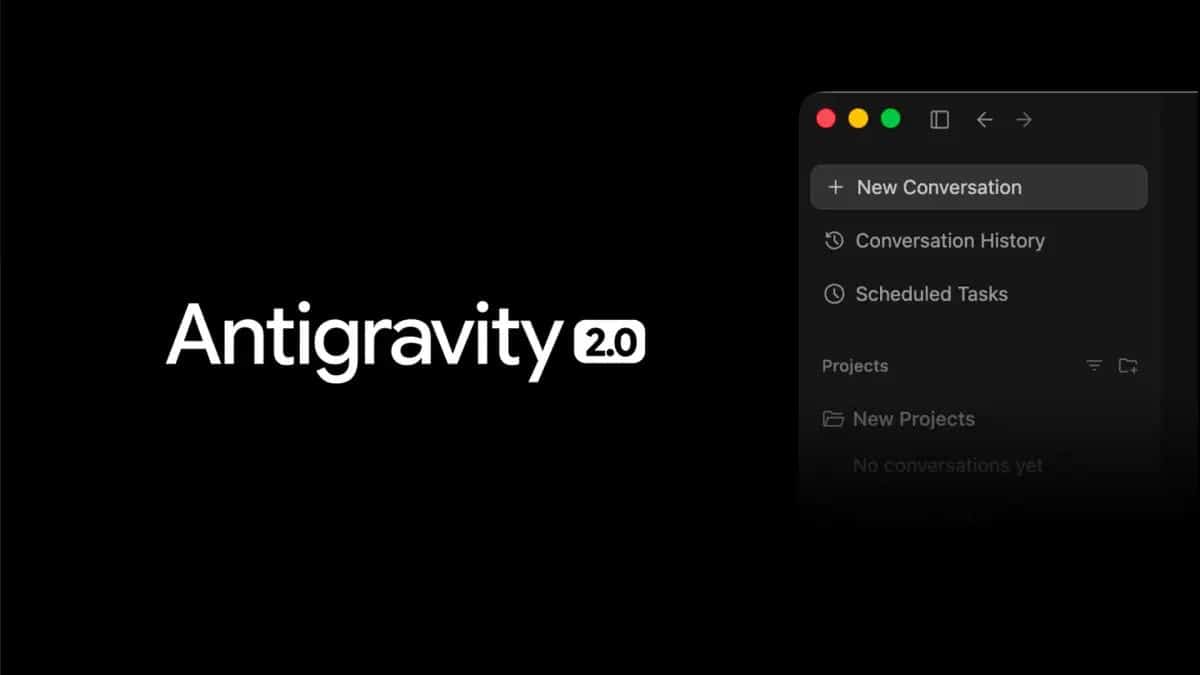
A command bridge for running many agents in parallel. Dynamic subagents (spawn and retire children on the fly), scheduled tasks (cron-style runs), and per-project permission scopes. The feel shifts from "one task in one editor" to "many tasks running at once, all in view."
>2-2Antigravity CLI — different UI, same harness
Successor to Gemini CLI. A lightweight UI for terminal people, but the key is that it shares the same agent harness as Desktop. The CLI isn't a separate product — it's a different interface to the same base. Agents you compose in Desktop behave identically from the CLI.
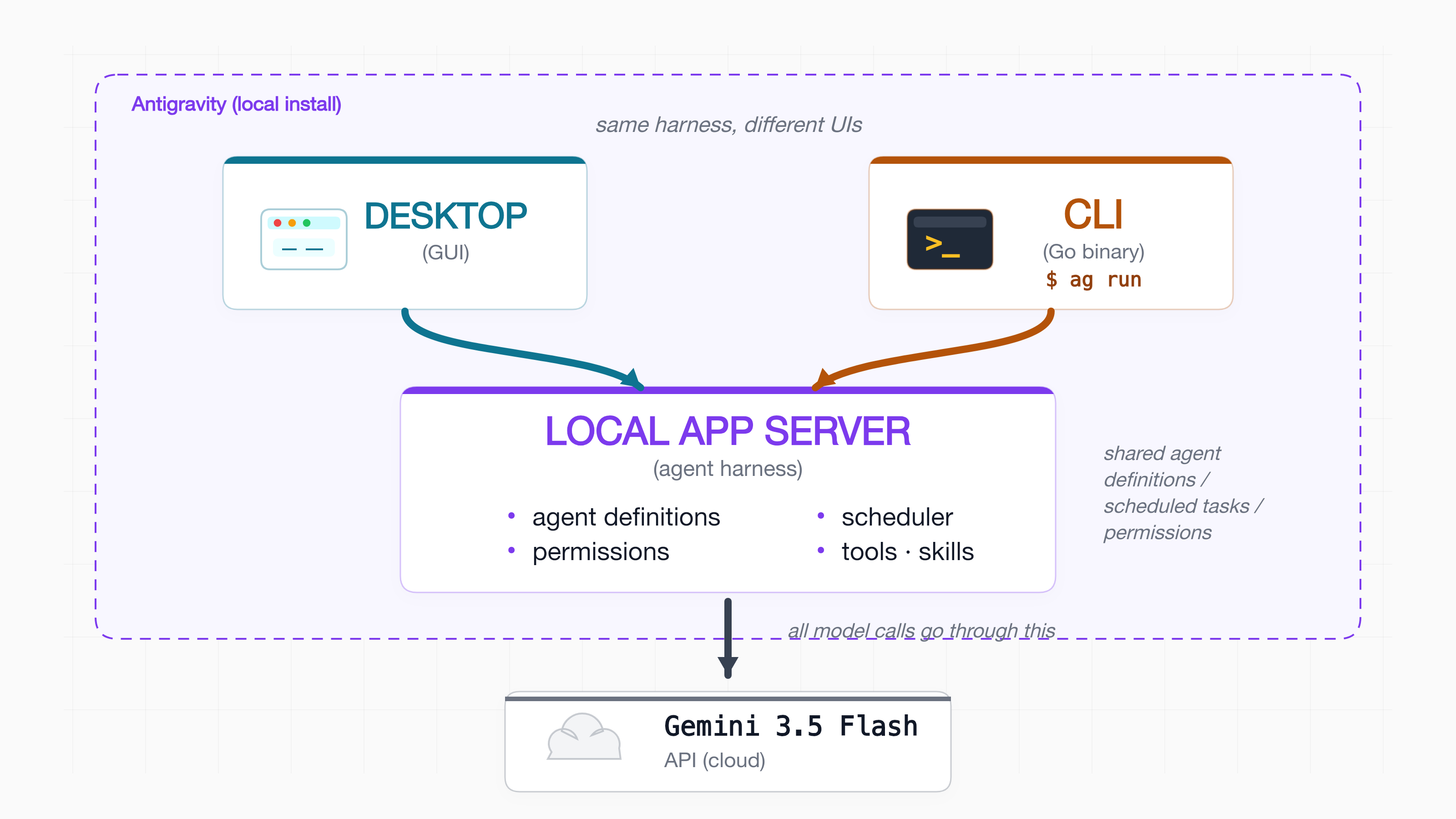
It is not two competing apps. It is one local installation that ships Desktop UI, CLI binary, and a shared local app server (the agent harness itself) together. @karthickdotxyz describes it as "Same tools and app server as Antigravity 2.0."
What that gives you:
・ You don't need both running — Desktop or CLI, either one is complete on its own
・ Configs, agent definitions, permissions, scheduled tasks are shared — a job set up in Desktop is callable from the CLI as-is
・ CLI fits CI / headless servers; Desktop fits interactive development. Natural separation by use case.
(The exact behaviour of the local app server — whether it runs as a daemon, only when Desktop is open, etc. — is not in the public docs yet. The description here is inferred from @karthickdotxyz's wording.)
>2-3SDK — embed the harness into your own product
Google's agent harness is now something you embed into your own workflow or product. This stops being "a tool that makes AI write code" and starts being "a platform for building and operating AI agents." The code you write with the SDK runs on your own PC / server / CI runner — Google does not host it for you; it lives inside your process as part of your product. Antigravity could become a component that runs inside other companies' products, not just Google's IDE.
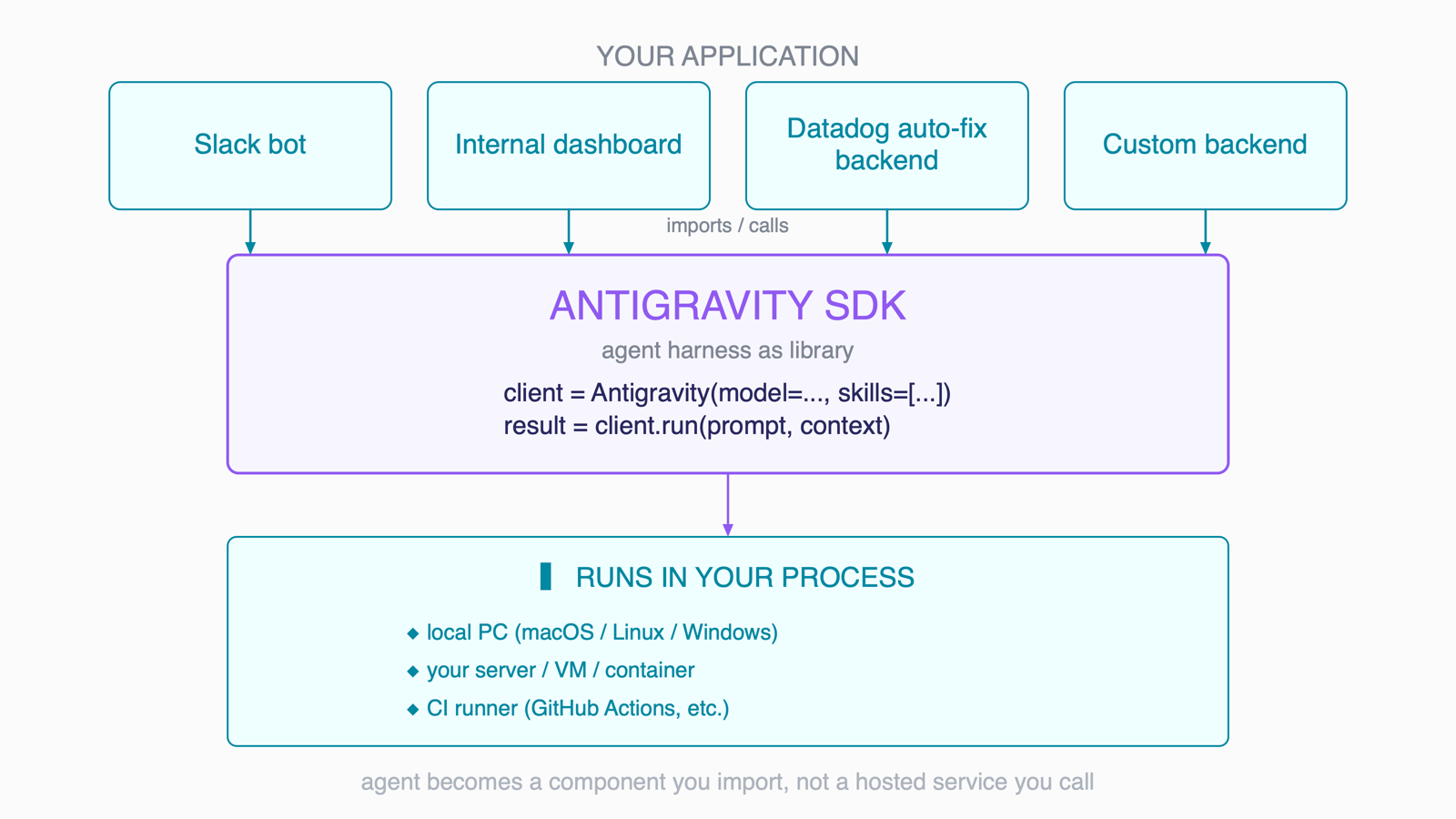
client = Antigravity(...) / result = client.run(prompt, context)). Bottom tier = the SDK runs in your own process (local PC / your server, VM, container / CI runner) — Google does not host the runtime for you. The agent stops being "a hosted service you call" and becomes "a component you import."Both run on local machines or on servers. The real distinction is the primary use case each is designed for:
・ CLI = an interactive front designed for a human (or shell script) to drive an agent directly — you type antigravity chat / antigravity run and get a result back
・ SDK = a library designed for your program to drive the agent via function calls — fits Slack bots, internal dashboards, Datadog-alert auto-remediation backends
Strictly, you can also call the CLI from a program by shelling out (subprocess.run("antigravity ...")). But shelling out comes with costs: (a) process startup overhead / (b) brittle text-output parsing / (c) no types / (d) streaming and structured events are awkward. The SDK assumes that use case from the start — typed responses, long-lived connections, streaming, structured events.
It is the same shape as AWS CLI vs boto3 (the AWS Python SDK). You can shell out aws s3 ls from Python, but boto3.client("s3") is the proper path. For Antigravity, both ultimately drive the same Google agent harness — but the SDK is the path optimised for programmatic consumption.
>2-4AI Studio × Android × Firebase integration
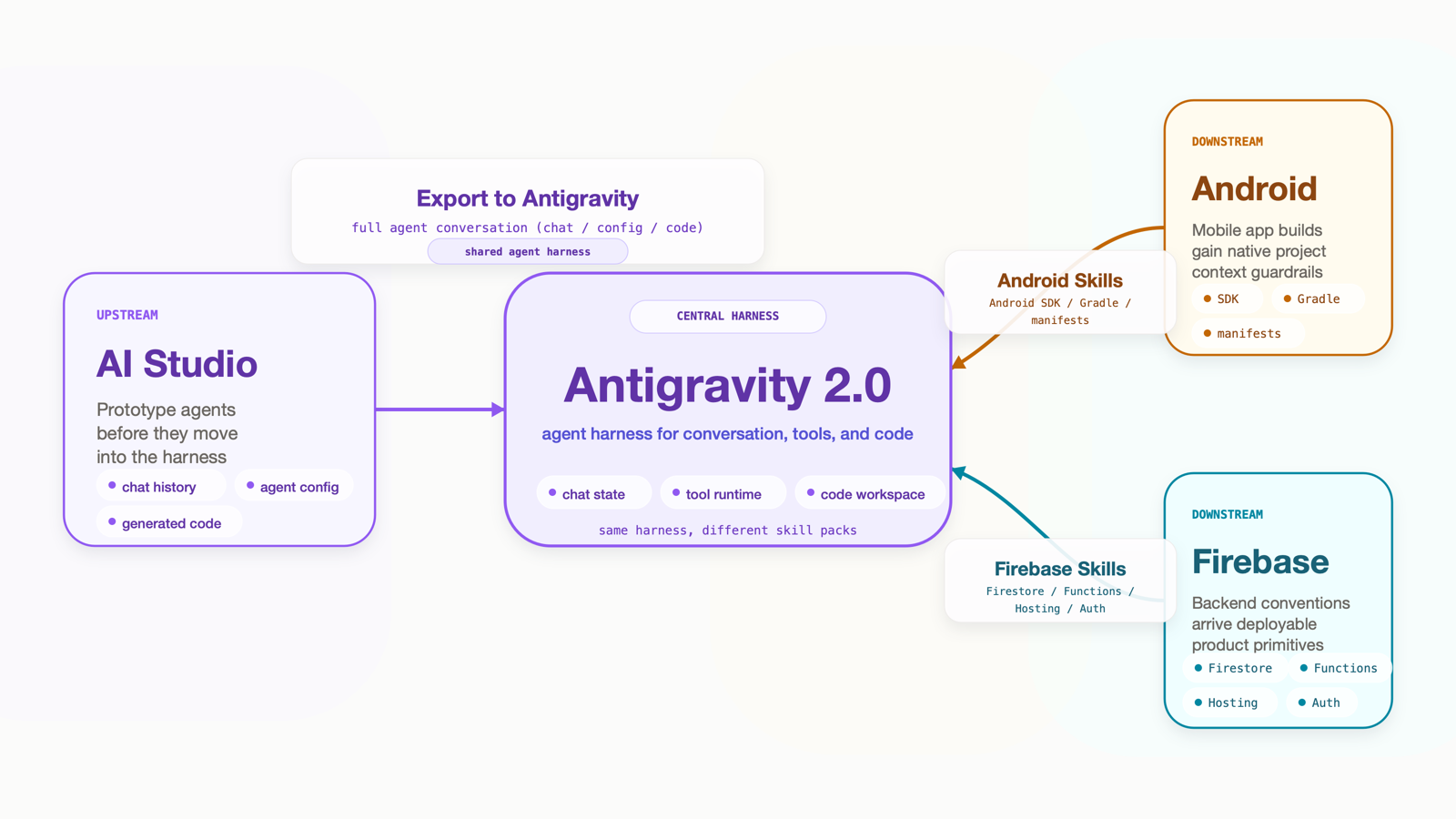
Less "three products wired together at the UI layer," more "Antigravity sits in the middle as the harness, with AI Studio (entry) and Android / Firebase (exit) bolted on via a shared harness and Skills." Concretely:
- AI Studio → Antigravity ("Export to Antigravity"): AI Studio Build now runs on the same agent harness as Antigravity. A dedicated Export to Antigravity button hands off the full agent conversation (chat history, agent configuration, generated code) into the local Antigravity environment. Not "copy-paste the prompt again" — an official, state-preserving migration from web prototype to local production.
- Antigravity → Android: Equip the agent with the official Android Skills — Android SDK / Gradle / manifests become part of the agent's context. Going further, the
studiocommand in Android CLI 1.0 lets the agent connect to a running Android Studio instance and borrow its deep codebase understanding (an agent-initiated "Open in Android Studio"-style handoff). Together these handle end-to-end Android app construction. - Antigravity → Firebase: Likewise Firebase Skills teach the agent Firestore / Functions / Hosting / Auth conventions, including configuration and deployment
So Google's "vertical integration" play is re-engineered not at the UI layer but at the harness and Skill (attachable capability packs) layer. The mechanism for compressing idea → build → verify → ship is implemented as agent infrastructure, not as more editor features.
Not a "specialist worker" — Antigravity sits at the Agent OS layer
The phrase "Agent OS" used throughout this piece is not Google's official terminology. Right after the Antigravity 2.0 launch, @grok on X called it "the emerging Agent OS category," and @arsh_goyal framed it as a "centralized Agent Manager." This article borrows that framing to describe a specific structural pattern: a single harness shared across multiple UIs (Desktop / CLI / SDK / integration funnel), with permissions, scheduling, and sub-agent orchestration unified at one layer. We use the OS metaphor as an editorial lens, not as a brand or product category claimed by Google.
Lining up Antigravity 2.0 with Claude Code / Codex CLI / Grok Build and asking "which one's best" misses the point. They live at different layers.
>3-1Specialist worker layer vs Agent OS layer
With Antigravity 2.0, a Google-native "Agent OS-class" product joins the front line. Inside Google, Workspace Studio sits closed within Workspace as the "Workspace-internal Agent OS"; Antigravity targets a cross-cutting Agent OS for the dev context.
>3-2"VS" framing breaks across layers
"Antigravity 2.0 vs Claude Code" is a layer violation. As Antigravity expands via the SDK inside other companies' products, the natural composition becomes "Antigravity-on-top, calling Claude Code / Codex CLI / Grok Build as workers." The right peers to compare with are Hermes / Copilot Studio — same Agent OS layer.
Within the Agent OS layer:
Hermes = OSS / individual-tilted / multi-model / 22 gateways / Obsidian integration / domain-agnostic (works outside coding too)
Microsoft Copilot Studio = M365 territory / enterprise permissions / Power Platform integration / business-workflow focused
Google Antigravity 2.0 = Google-native / AI Studio × Android × Firebase vertical integration / software-engineering specialised (officially "Built for developers for the agent-first era")
The scope difference matters: sitting at the same Agent OS layer does not mean the same role. Hermes is a domain-agnostic general harness; Copilot Studio is for business workflows; Antigravity is purpose-built for software-engineering work. The question is "which domain do you want to orchestrate agents in" — that's what decides the choice between them.
New comparison axes — "which model is smarter" is no longer enough
My read: what Antigravity 2.0 actually changed is not "another AI coding tool entered the market" but the comparison axis itself. Reading the four pillars from §02 (Desktop / CLI / SDK / integration funnel) as a structure, each pillar embeds a design decision that the old axis "which model is smarter" simply cannot capture:
- Desktop's dynamic subagents + scheduled tasks → "which harness do you compose with" / "when do you schedule the execution"
- CLI sharing an app server with Desktop (FIG §2-2) → "same harness, different UI" is itself a harness-design decision
- SDK running in your own process (FIG §2-3) → "which permission boundary, where does it run" is decided by the caller
- AI Studio / Android Skills / Firebase Skills (FIG §2-4) → "what context does the agent get" is governed by attachable Skill packs
- Antigravity's "agentic IDE" output review surface → "how does the human review"
So if you unpack the structure of Antigravity 2.0 honestly, the five axes — harness / permission boundary / context / timing / review — surface naturally. They are the axes that show up the moment you ask "what is an Agent OS the union of?"
The five design axes used below (harness / permission boundary / context / timing / review) are not a standard framework published by Google, IDC, Forrester, or anyone else — they are my (the author's) editorial synthesis of what I think actually matters. My reasoning for picking these specific 5 (and not 3 or 7):
- harness — with model IQ commoditising, harness design is what determines an agent's actual behaviour. The next battleground after "which model is smarter."
- permission boundary — when agents act autonomously, permission scope decides the blast radius (read / write / exec / against what).
- context — same model + same IQ produces wildly different output depending on context given. I wrote a separate piece on this.
- timing — manual / hook / cron agents are different beasts. Antigravity 2.0 making scheduled tasks first-class is evidence this matters.
- review — human-in-the-loop verification load is the productivity bottleneck. Also standard vocabulary in AI safety.
The individual terms (harness / permission etc.) have currency across the industry, but bundling these 5 as "the evaluation axes that matter" is my judgement. Someone proposing a different cut would be perfectly reasonable.
What Antigravity 2.0 really points to is a demand to update the axis itself.
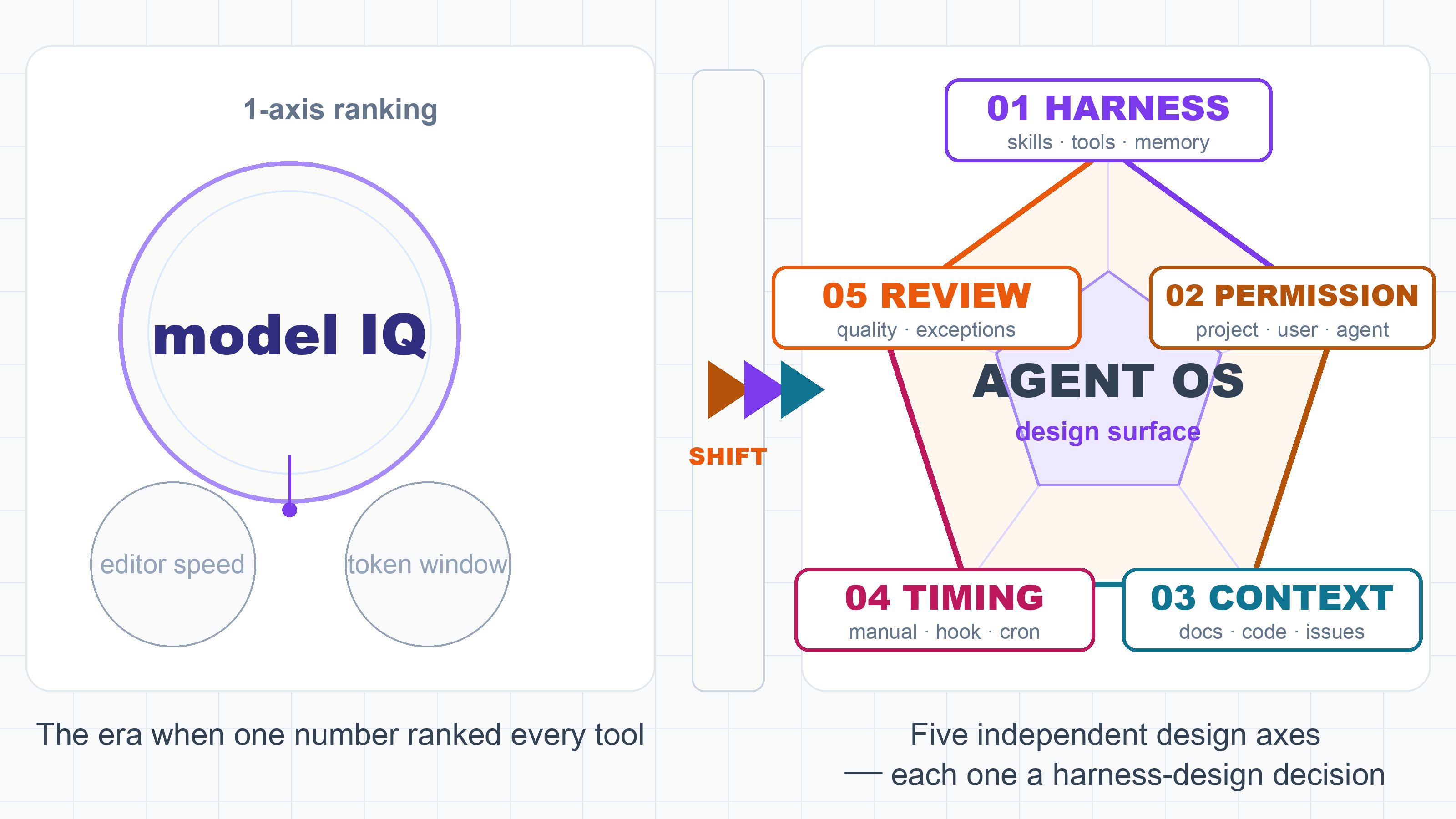
Side-by-side, what changes per axis between the editor era and the Agent OS era is unmistakable:
| Axis | Editor era (~2025) evaluation | Agent OS era (2026 →) evaluation |
|---|---|---|
| harness | Editor's completion speed / UX (Cursor vs Claude Code vs Codex — which feels faster / nicer) | Which tools, memory, permissions, feedback loops you wrap around the model. Same model, different harness → different behaviour entirely. |
| permission | Largely a non-question — one developer typing at the keyboard, manual control everywhere | Autonomous agents run, so Project / User / Agent-scoped permissions define blast radius (read / write / exec against which resources) |
| context | Context window size (how many tokens fit — a "quantity" axis) | What you actually pull in and hand the agent (docs / code / issues / ops logs / diff rationale — a "quality" axis, plus Skill packs) |
| timing | Does completion appear at the moment a human is typing? (synchronous / immediate only) | Manual / hook / cron / scheduled tasks — when do agents fire? (Async / parallel / 24-7 included) |
| review | Humans read before and after writing code (human-led, AI assists) | How far do you trust auto-executed agent output, and where does a human gate it? (Minimising verification load) |
Footnote: the old axis "which model is smartest" (GPT-5 / Claude Opus / Gemini / grok-4.3) no longer stands on its own — same model with different harness and context produces wildly different output, so model IQ alone has collapsed as a comparison axis.
These five decide developer productivity itself. Smarter models with sloppy harnesses just automate Slop (the "don't automate Slop" principle applies here too).
The Harness Engineering thread from the previous post ("Don't build an AI that replays yesterday's spec") connects directly. By Karpathy's framing — Agent = Model + Harness — Antigravity 2.0 reads exactly as Google's first-party Harness-supply platform.
The next battlefield of AI coding is not inside the editor
The conclusion is simple. The next battlefield of AI coding is not inside the editor — it is how you orchestrate, supervise, and continuously run agents.
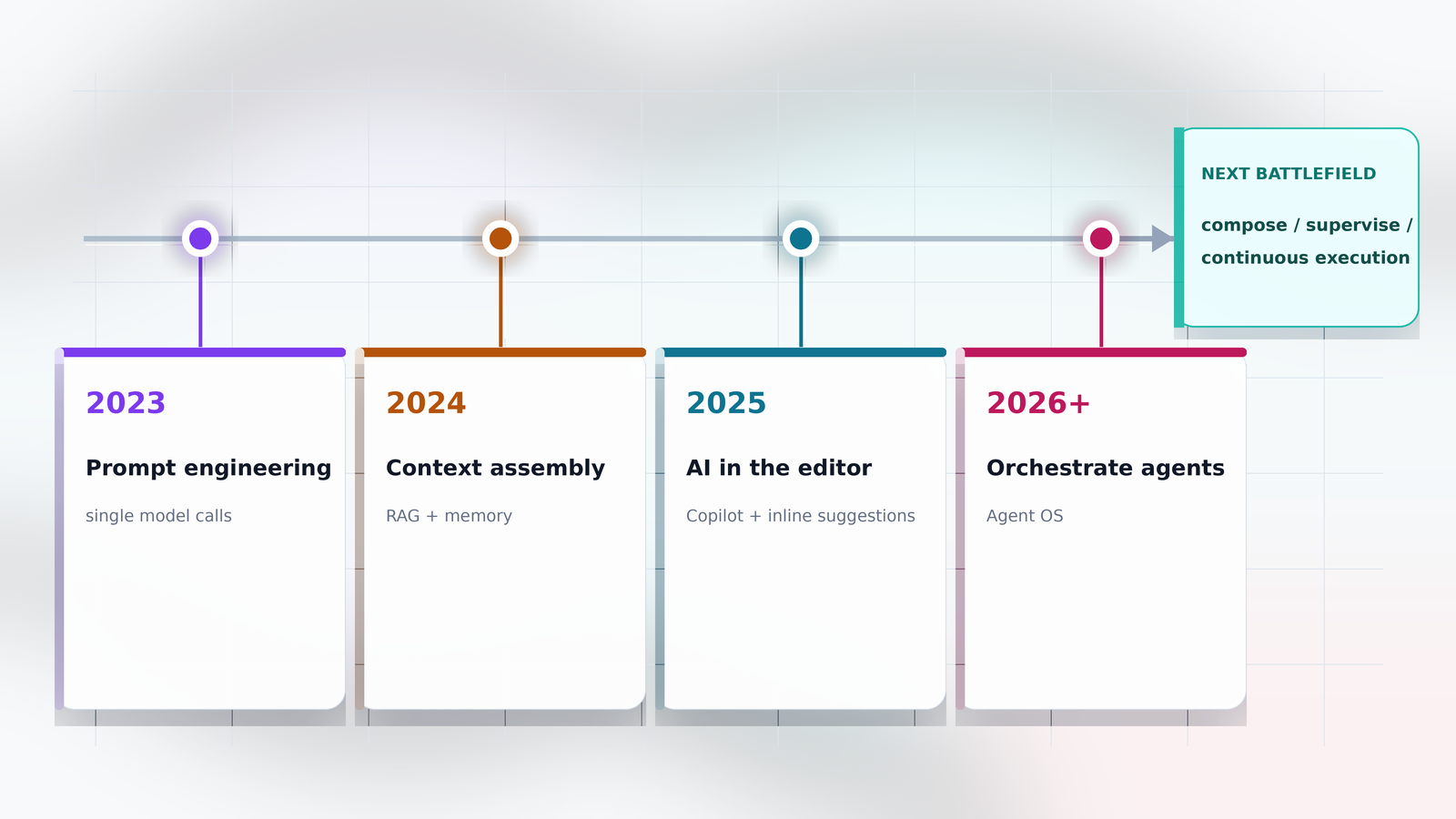
Past battlefields:
- 2023: prompt craft (prompt engineering)
- 2024: context preparation (vibe coding / Cursor)
- 2025: in-editor AI intervention (Claude Code / Codex / Grok Build)
The next:
- 2026→: Agent OS / harness design — Antigravity 2.0 / Hermes / Copilot Studio / Workspace Studio
- The individual developer's toolkit moves from "editor alone" to "Agent OS + specialist workers"
- "Run many tasks in parallel / let them self-drive on cron / accumulate your own context into the harness" becomes daily
Orchestrate = who is assigned what (permission boundary design)
Supervise = when and how humans step in for review (minimising verification load)
Continuously run = 24/7 via cron / webhook / hooks
None of these are editor-resident jobs. They are clearly Agent OS work.
Snapshots from X in the 48 hours since launch — building a full OS from scratch, recreating the AlphaZero paper, code-analysis pipelines, scheduled parallel agents. The chatter is visibly shifting from "a specialist worker writes code" toward "a fleet of agents gets orchestrated."



How individuals and enterprises choose
The "individuals should X, enterprises should Y" guidance below is my personal recommendation, not an official line from Google, Microsoft, or Nous Research.
Fact-based (verifiable):
・ Hermes is OSS / multi-model / Obsidian integration / domain-agnostic
・ Antigravity 2.0 is vertically integrated into the Google ecosystem / software-engineering specialised
・ Microsoft Copilot Studio sits in the M365 territory / business-workflow focused
My personal view (where reasonable people will disagree):
・ "For individual developers, combine Hermes and Antigravity" — I say this because (1) Hermes' Obsidian / gateway integration fits individual knowledge work, and (2) Antigravity is optimal for Google-ecosystem development. This is extrapolated from my own workflow as an individual developer. Organisations may legitimately optimise differently.
・ "For organisations, mix across domains" — I say this because the requirements for business workflows (Copilot Studio), dev workflows (Antigravity), and individual knowledge work (Hermes) are too different to consolidate on one product. Counter-views exist ("just unify on Copilot Studio for ops simplicity"; "stay OSS-only on Hermes for transparency") and are perfectly reasonable.
Not a definitive answer — translate to your own context.
What changes between individual and team / enterprise use, axis-by-axis (§04 5 axes), makes the picking criteria explicit:
| Axis | Individual use | Team / enterprise use |
|---|---|---|
| harness | Each developer installs whichever harness they prefer locally (Claude Code / Hermes / Cursor / Antigravity) | A standardised harness across the org / custom harness embedded via the Antigravity SDK into internal products |
| permission | Mostly read / write against your own Mac and your own repos | Hierarchical ACL across Project / User / Role; permission separation against internal systems; per-agent scope restrictions |
| context | Your own Obsidian, your own git repos, your own Slack DMs — sources you personally hold | Internal Confluence / shared GitHub orgs / company Slack / Linear & Jira / on-call runbooks — sources shared across many users |
| timing | Interactive on your PC, or a light personal cron (stops the moment your Mac is asleep) | Embedded via SDK in a shared server / CI runner / 24-7 environment. Runs outside business hours; ownership is explicit |
| review | Personal self-check (read while you write) | Code review / PR approval flow / audit logs / compliance checks — multi-stage gating required |
Footnote: the concept of "harness" itself is neutral to individual vs team use — it's just the runtime wrapping the model. Team-readiness depends on the specific implementation: Claude Code / Hermes / Cursor are basically "local, per-individual"; Antigravity 2.0 splits the difference (Project permissions + SDK + Enterprise wording cover both individual and team); Copilot Studio is M365-native and assumes "team / business" from the start.
Antigravity's standalone Desktop / CLI is structurally built around "an app server pinned to one machine" (see FIG §2-2). Even if a team wants to share the same harness, agent definitions / Projects / scheduled tasks are bound to each local app server — sharing the config via git still leaves you with separate instances.
If you actually want a "shared" harness for a team, the realistic route is via the SDK (§2-3): embed it into an internal backend / shared server / CI runner so multiple users hit a single harness instance you operate. Until Google ships a hosted "Managed harness," "team harness as a service" is something you have to build yourself — that's the current constraint.
>6-1Individuals — Hermes and Antigravity in combination
OSS-leaning individuals still get great value from Hermes. Obsidian integration, multi-model routing, the gateway pack (Telegram / Discord / LINE / Slack) are Hermes-only as of now.
Google-ecosystem-leaning individuals are well-served by Antigravity. The integrated funnel from AI Studio prototype → Antigravity Desktop → Firebase ship is something Hermes can't reproduce.
The practical answer is both. Let Hermes orchestrate your tacit-thoughts pool dynamically; let Antigravity handle heavy Google-ecosystem dev work.
>6-2Enterprise — three Agent OSes, three contexts
For enterprises, the natural pattern is three Agent OSes split across "business," "dev," and "personal":
- Microsoft Copilot Studio — business automation inside M365 / Power Platform
- Google Workspace Studio — business automation inside Google Workspace
- Google Antigravity 2.0 — Agent OS for the dev context (cross-cutting)
Selection is largely "which ecosystem are you anchored in." M365-centric → Copilot Studio. Google-centric → Antigravity + Workspace Studio. Treat business (Workspace/M365) and dev (Antigravity) as separate Agent OSes running together — that is the natural fit.
The role of "pulling tacit knowledge / tacit thoughts out of the field and feeding them into the right harness" — across all three Agent OSes — is exactly the FDE / Applied Engineer sweet spot. The end of editor-only work is the same trend as the rise of people who bridge field × AI.
"Which model is smarter" is no longer enough — the Agent OS design era is here
The Antigravity 2.0 release marks a turning point in how we compare AI-coding tools. From "comparing models inside editors" to five axes — harness design / permission boundaries / context / scheduling / review — comparing Agent OS designs.
Claude Code / Codex / Grok Build are specialist workers. Antigravity 2.0 / Hermes / Copilot Studio / Workspace Studio are Agent OSes. A "VS" framing across these layers no longer holds. The conversation must shift to within-layer comparison and across-layer composition.
- Editor-only comparison is a generation behind (raw model strength is commoditising fast)
- Agent OS design is the new differentiation (harness × permissions × context × scheduling × review)
- "Orchestrate · supervise · continuously run" is the next battlefield
Individuals: combine Hermes and Antigravity. Enterprises: combine Copilot Studio / Workspace Studio / Antigravity across business, dev, and personal contexts. Productivity is decided not in the editor, but in the Agent OS design. The next phase of AI coding starts here.